• Home
  • Create
  • Nano Banana Pro
  • Pricing
  • Blog
Nano Banana Web LogoNano Banana Web
Create
Nano Banana Pro
AI Image
Nano BananaNano Banana ProZ-Image
AI Video
Veo 3.1Sora 2Grok Imagine
Pricing
Blog
Sign In
  1. Home
  2. Z-Image
Link
CreateNano Banana ProPricingBlog
AI Image
Nano BananaNano Banana ProZ-Image
AI Video
Veo 3.1Sora 2Grok Imagine
Company
AboutContact UsPrivacy PolicyTerms of ServiceRefund Policysupport@nanobananaweb.io
Nano Banana Web LogoNano Banana Web

© 2025 Nano Banana Web. All rights reserved.

MossAI ToolsAI工具网DironixTurbo0Dang.aiCode.MarketArtificinTwelve ToolsFindly ToolsAI Agents DirectoryStartup FastStartup FameFazierShowMySites

Transform Words into Photorealistic Images in Under 1 Second With Z-Image

Z-Image is your ultimate open-source AI image generator, turning simple words into breathtaking, photorealistic visuals. Powered by 6 billion parameters, it delivers unmatched quality—outperforming models five times its size. Craft stunning portraits, sleek product shots, and imaginative artwork without costly subscriptions. Best of all, Z-Image runs on your own hardware, giving you total creative control. Start creating professional-grade visuals now—no design skills required.

Start Creating Free
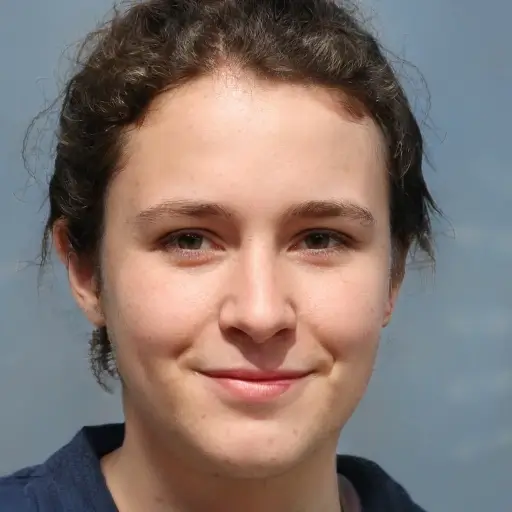
Z-Image AI generated photorealistic portrait demonstrating image quality

What Is Z-Image?

Z-Image is a groundbreaking 6 billion parameter AI image generation model created by Alibaba's Tongyi Lab. Launched in November 2025, it leverages a cutting-edge Single-Stream Diffusion Transformer architecture, delivering faster and more efficient image creation than ever before.

Built for Speed Without Sacrificing Quality

Most AI image generators force you to choose between speed and quality. Z-Image shatters this compromise. The Z-Image Turbo variant produces stunning 1024×1024 photorealistic images in just 2.3 seconds on an RTX 4090—25 times faster than Flux, which takes 57 seconds for the same task. Get professional-grade results without the wait. The secret? Its brilliantly efficient architecture. While competitors balloon to 20 billion or even 32 billion parameters, Z-Image achieves comparable quality with just 6 billion. This translates to lower hardware demands and lightning-fast generation. Run Z-Image on a consumer GPU with 16GB of VRAM—no costly cloud computing required.

Z-Image speed comparison infographic showing 25x faster generation

Open Source and Fully Customizable

Z-Image is released under the Apache 2.0 license, giving you complete ownership of your creations. Train custom LoRAs for consistent characters. Use ControlNet for precise pose and composition control. Seamlessly integrate Z-Image into your workflow with ComfyUI or the Diffusers library. The model offers three tailored variants. Z-Image Base provides full control with negative prompts and classifier-free guidance. Z-Image Turbo prioritizes speed with 8-step generation. Z-Image Edit handles image modifications and inpainting. Choose the right tool for every task.

Z-Image open source integration with ComfyUI developer workflow

Bilingual Text Rendering That Actually Works

Text in AI-generated images has always been a challenge. Z-Image solves this with native bilingual support. Create posters, social media graphics, and branded content with flawless Chinese and English text. The model understands both languages natively, ensuring accurate rendering every time. Say goodbye to garbled characters and misspelled words.

Z-Image bilingual text rendering example with Chinese and English

Why Choose Z-Image Over Other AI Generators?

The AI image generation market is crowded. Here's why Z-Image rises above Midjourney, DALL-E, and Flux.

25x Faster Than Flux

Time is money. Z-Image Turbo generates images in just 2.3 seconds, while Flux takes a sluggish 57 seconds. That's not a typo—you can create 25 images in the time Flux produces one. Faster iteration means better results, faster.

Z-Image vs Flux speed comparison showing 25x faster generation

No Subscription Required

Midjourney starts at $10 per month. DALL-E costs $20 monthly through ChatGPT Plus. Z-Image? Completely free and open source. Run it locally on your own hardware with no usage limits and no recurring fees. Your creativity deserves freedom, not a price tag.

Z-Image cost comparison showing free vs paid competitors

Runs on Consumer Hardware

No data center? No problem. A gaming GPU with 16GB VRAM handles Z-Image with ease. Its efficient 6B parameter design ensures lower memory usage without compromising quality. Create professional-grade images on the hardware you already own.

Z-Image running on consumer gaming PC with 16GB GPU

Discover the Magic of Z-Image Creations

Whether it's lifelike portraits or otherworldly landscapes, Z-Image effortlessly adapts to any style you imagine. Check out these stunning examples—all generated with just a few words.

Z-Image photorealistic elderly fisherman portrait with detailed skin texture
View Details

Photorealistic Portraits

Bring human expressions to life with hyper-realistic details—flawless skin textures, natural lighting, and striking compositions. Ideal for social media, virtual influencers, or any project that demands authenticity.

Z-Image generated professional product photography of luxury watch
View Details

Product Photography

Elevate your product imagery with flawless shots tailored to any setting—luxury, casual, or festive. Save up to 99% on traditional photography costs while achieving commercial-grade quality.

Z-Image fantasy forest artwork with glowing bioluminescent elements
View Details

Creative Artwork

Dive into boundless creativity with Z-Image. From enchanting fantasy worlds to futuristic sci-fi cities, it delivers consistent, high-quality results across every artistic style, including anime and cinematic masterpieces.

How to Use Z-Image

Start creating stunning AI-generated images in just minutes. Follow these quick and easy steps to bring your vision to life.

1

Step 1: Choose Your Platform

Access Z-Image instantly online with zero setup, or install it locally using ComfyUI or the Diffusers Python library. The web option is perfect for instant creativity—just open your browser and dive in.

2

Step 2: Write Your Prompt

Craft a detailed description of your desired image. Include specifics like subject, scene, style, and quality for the best results. For example: A 25-year-old woman in a red coat walking her golden retriever on a city sidewalk, morning light, photorealistic, 8K.

3

Step 3: Generate and Download

Click 'Generate' and watch the magic happen in as little as 1-10 seconds, depending on your hardware. With Z-Image Turbo, results appear in under 2 seconds on modern GPUs. Download your high-resolution image (up to 2048×2048 pixels) and refine as needed to achieve perfection.

1

Step 1: Choose Your Platform

Access Z-Image instantly online with zero setup, or install it locally using ComfyUI or the Diffusers Python library. The web option is perfect for instant creativity—just open your browser and dive in.

2

Step 2: Write Your Prompt

Craft a detailed description of your desired image. Include specifics like subject, scene, style, and quality for the best results. For example: A 25-year-old woman in a red coat walking her golden retriever on a city sidewalk, morning light, photorealistic, 8K.

3

Step 3: Generate and Download

Click 'Generate' and watch the magic happen in as little as 1-10 seconds, depending on your hardware. With Z-Image Turbo, results appear in under 2 seconds on modern GPUs. Download your high-resolution image (up to 2048×2048 pixels) and refine as needed to achieve perfection.

Try It Now - Free

What Users Say About Z-Image

Thousands of creators trust Z-Image to elevate their projects. Here's what they're raving about.

“
Sarah Chen

Sarah Chen

E-commerce Seller

“Z-Image transformed my workflow. I used to spend hours on product photography, but now I create professional-grade shots in seconds. The bilingual text feature is a huge bonus for my global audience. Hands down, the best free tool out there!”
“
Marcus Rodriguez

Marcus Rodriguez

AI Developer

“I compared Z-Image to Flux on my RTX 4090, and the results blew me away—2 seconds versus nearly a minute. The quality is equally impressive for my needs. Z-Image Turbo is now my go-to for rapid prototyping.”
“
Yuki Tanaka

Yuki Tanaka

Digital Artist

“As an open-source tool, Z-Image is a dream for custom training. I've created character LoRAs that produce consistent, accurate results every time. The community support is incredible—tutorials are everywhere. Highly recommend it for serious AI artists!”

Frequently Asked Questions

Find clear answers to your top questions about Z-Image.

To ensure smooth performance, Z-Image requires at least 16GB of VRAM. For optimal results, especially when training LoRAs, 24GB VRAM is ideal. This makes it fully compatible with consumer GPUs like the RTX 4090, RTX 3090, or RTX 4080.

Z-Image Base delivers the highest quality and maximum control, featuring support for negative prompts and classifier-free guidance with 28-50 inference steps. Z-Image Turbo, on the other hand, is a streamlined version designed for speed, generating images in just 8 steps but without negative prompt support. Choose Base for precision and Turbo for rapid output.

Yes! Z-Image is 100% free and open source under the Apache 2.0 license. Use it for personal or commercial projects without paying a dime. Run it locally or access it via free online platforms—no subscriptions, no limits.

Absolutely. Z-Image excels at rendering text in both Chinese and English, making it a perfect tool for posters, social media graphics, marketing materials, and branded content. Its bilingual capabilities are built-in, ensuring precise and natural character formation.

Z-Image rivals the photorealistic quality of Midjourney and DALL-E while offering standout advantages: it's free, open source, and runs locally. While Midjourney shines in artistic styles but costs $10+ monthly, and DALL-E integrates with ChatGPT for $20 per month, Z-Image delivers professional-grade results with zero ongoing costs.

Yes, you can! Z-Image supports LoRA training to create unique characters, styles, and concepts. Use tools like AI Toolkit or ComfyUI Realtime-Lora nodes. You'll need 24GB VRAM and a dataset of 10-20 images to get started. Comprehensive tutorials from the community are available to guide you through the process.

Z-Image supports resolutions ranging from 512×512 to 2048×2048 pixels in any aspect ratio. Whether you're creating square social posts, vertical phone wallpapers, or wide desktop backgrounds, Z-Image adapts seamlessly to your needs.

This issue often points to GPU compatibility or incorrect settings. For Z-Image Turbo, keep CFG at 1.0 and steps at 8—higher values may distort the image. If you're using newer GPUs like the RTX 5090, update the Diffusers library or adjust data types. Check out community troubleshooting guides for tailored solutions.

Explore More AI Tools

Uncover other powerful AI tools from Nano Banana Web to elevate your creative workflow.

  • Nano Banana
  • Nano Banana Pro
  • Veo 3.1
  • Sora 2

Unleash Your Creativity with Z-Image

Join thousands of creators transforming their ideas into stunning visuals—instantly and effortlessly. No subscriptions. No design skills. Just your imagination and a simple text prompt. Start using Z-Image for free today and bring your vision to life.

Try Z-Image Free